

OAuth 2.0 API
Merchant API
Administrative API
Integration Specification
Celbux API Call Structure
OAUTH 2.0 API
Introduction
Please note
Description
Resource URL
createUserVoucherRequest
Request Header
Request Body
createUserVoucherResponse
Response Body
Description
Resource URL
eftOutRequest
Request Header
Request Body
eftOut Response
Response Body
Description
Resource URL
Parameters
listUserVouchersRequest
Request Header
Request Body
listUserVouchersResponse
Response Body
Description
Resource URL
settleUserVoucherRequest
Request Header
Request Body
settleUserVoucherResponse
Response Body
Description
Resource URL
transfertoUserRequest
Request Header
Request Body
transfertoUserResponse
Response Body
Description
Resource URL
ViewUserBalanceRequest
Request Header
Request Body
viewUserBalanceResponse
Response Body
Description
Resource URL
viewUserTransactionsRequest
Request Header
Request Body
viewUserTransactionsResponse
Response Body
MERCHANT API
Description
Resource URL
PayRequest
Request Header
Request Body
PayResponse
Response Body
Description
Resource URL
Request Header
Request Body
WithdrawResponse
Response Body
Resource URL
DepositRequest
Request Header
Request Body
DepositResponse
Response Body
Description
Resource URL
ConfirmRequest
Request Header
Request Body
ConfirmResponse
Response Body
Description
Resource URL
PaymentRequest
Request Body
PaymentResponse
Response Body
ADMINISTRATIVE API
Introduction
Environment
Simulation Environment
Description
Resource URL
addUsersToCommunities Request
Request Header
Request Body
addUsersToCommunities Response
Response Body
Description
Resource URL
changeMSISDN Request
Request Header
Request Body
changeMSISDN Response
Response Body
Description
Resource URL
createBearerToken Request
Request Header
Request Body
createBearerToken Response
Response Body
Description
Resource URL
createMerchantRoute Request
Request Header
Request Body
createMerchantRoute Response
Response Body
Description
Resource URL
createMerchantStore Request
Request Header
Request Body
createMerchantStore Response
Response Body
Description
Resource URL
createOAuthClient Request
Request Header
Request Body
createOAuthClient Response
Response Body
Description
Resource URL
createUser Request
Request Header
Request Body
createUser Response
Response Body
Description
Resource URL
CreateVoucherRequest
Request Header
Request Body
CreateVoucher Response
Response Body
Description
Resource URL
CreateVoucherType Request
Request Header
Request Body
CreateVoucherType Response
Response Body
Description
Resource URL
linkMerchant Request
Request Header
Request Body
LinkMerchant Response
Response Body
Description
Resource URL
actionhistory/read Request
Request Header
Request Body
actionhistory/read Response
Response Body
12 – Remove Users from Communities
Description
Resource URL
removeUsersFromCommunities Request
Request Header
Request Body
removeUsersFromCommunities Response
Response Body
Description
Resource
ResetPassword Request
Request Header
Request Body
ResetPassword Response
Response Body
Description
Resource URL
sendOTP Request
Request Header
Request Body
SendOtp Response
Response Body
Description
Resource URL
UnlinkMerchant Request
Request Header
Request Body
linkMerchant Response
Response Body
Description
Resource URL
updateActorAuth Request
Request Header
Request Body
updateActorAuth Response
Response Body
Description
Resource URL
updateUser Request
Request Header
Request Body
updateUser Response
Response Body
Description
Resource URL
updateVoucherType Request
Request Header
Request Body
updateVoucherType Response
Response Body
Description
Resource URL
viewActorAuth Request
Request Header
Request Body
viewActorAuth Response
Response Body
20 – View Customer Transactions
Description
Resource URL
viewCustomerTransactions1 Request
Request Header
Request Body
viewCustomerTransactions1 Response
Response Body
Description
Resource URL
viewMerchantStores Request
Request Header
Request Body
viewMerchantStores Response
Response Body
22 – View Merchant Voucher Types
Description
Resource URL
viewMerchantVoucherTypes Request
Request Header
Request Body
viewMerchantVoucherTypes Response
Response Body
Description
Resource URL
viewUser Request
Request Header
Request Body
viewUser Response
Response Body
Description
Resource URL
viewUserCommunities Request
Request Header
Request Body
viewUserCommunities Response
Response Body
Description
Resource URL
viewVoucher Request
Request Header
Request Body
viewVoucher Response
Response Body
Description
Resource URL
viewVoucherType Request
Request Header
Request Body
viewVoucherType Response
Response Body
27 – View Voucher Type Merchants
Description
Resource URL
viewVoucherTypeMerchants Request
Request Header
Request Body
viewVoucherTypeMerchants Response
HTTP and API Error Code
FAQ
What is a Bearer Token?
What is the difference between POST HTTP method and GET HTTP method?
What is an MEID?
What is a StoreID?
Should I use StoreID or MEID?
What is a Reference number?
What is a TID?
What format do I use the voucher number in the API call?
A) Celbux API Call Structure
All the API calls in this document have the following layout:
API Call Structure
Type
This specifies the REST call type: GET or POST
This is the structure of the API call. If this structure is not correct, the call will fail. The {BaseURL} in the call structures need to be replaced by the URL endpoint supplied to you.
Resource URL
This is the structure of the API call. If this structure is not correct, the call will fail. The {BaseURL} in the call structures need to be replaced by the URL endpoint supplied to you.
Request
The detail required in the call body is specified in this section. Any required fields that are left out, or fields that are populated incorrectly, will cause the call to fail.
Response
The response to a call is detailed in this section including fields returned with success or error codes.
B) OAuth 2.0 API Integration Information
OAuth 2.0 API Integration Information – Important
Introduction
The information described in this section is important to note to ensure the success of integration with the OAuth 2.0 Celbux calls.
Celbux supports only Authorization code (Grant Type) as their OAuth 2.0 strategy. The API’s published by Celbux are REST API’s that use simple HTTPS calls.
A Bearer Token will be allocated for a simulation environment, as well as a the URL specifically set-up for your dedicated use. This Bearer Token should be placed in the header of the REST Call under Authentication.
After successful completion of the simulation testing, new credentials will be supplied to you to permit operating in the live environment.
By default, all response and request payloads are in JSON format.
Celbux uses standard HTTP status codes when returning errors with additional fields in the body for the error name and code.
1 – Environments
Please note
| Base URL | api-v1-dot-celbuxproducts.appspot.com/v1/evm/ |
| Namespace | evmtest20170504 |
| OAuth URL | https://api-v1-dot-celbuxproducts.appspot.com/login/oauth/authorize?ns=evmtest20170504 |
| Access Token URL | https://api-v1-dot-celbuxproducts.appspot.com/login/oauth/access_token?ns=evmtest20170504 |
| Client ID: | EVMUAT |
| Client Secret: | 550830b4-46ca-49534-8d55-360cc6f1219c |
| Simulation Environment URL | https://celbuxproducts.appspot.com/?ns=evmtest20170504 |
A cash voucher can only be used once and then the change will be moved back to your cash balance. A voucher number is valid for one transaction only.
2 -createUserVoucher
Description
Creating a voucher in the users’ wallet by specifying the amount, voucher type and cellphone number.
Resource URL
createUserVoucherRequest
| Name | Type | Description |
|
VoucherType
|
string |
VoucherType to be created – a valid voucher type
Type: string Example Values: Cash |
|
MSISDN
|
string |
Cellphone number receiving the voucher
Type: string Example Values: 27820000000 |
|
Reference
|
string |
A unique transaction reference number1.
1Reference numbers must be unique identifiers otherwise an error will be returned by the system
Type: string Example Values: 101 |
| Amount | int |
Default is currency of merchant. ISO 4217 Currency Codes
Type: int Example Values: ZAR |
| Currency | string | Default is currency of merchant. Example: ZAR (ISO 4217 Currency Codes) |
|
Metadata
|
string | Any other detail that the merchant wishes to store on this transaction |
|
RequestDT
|
string | Request date time for transaction execution. Example: 2013/01/01 12:00 |
Request Header
Authorization: {{accesstoken}}
Content-Type: application/json
Request Body
{
“VoucherType”: “Cash”,
“MSISDN”: “0825553356”,
“Reference”: “101”,
“Amount”: “1”,
“Currency”: “ZAR”,
“Metadata”: “{“tellerName”:”mike”}”,
“RequestDT”: “2013/01/01 12:00”
}
createUserVoucherResponse
| Name | Type | Description |
| VoucherNo | string | A valid voucher number. Example: 228 00000 00000 |
| Reference | string | A unique transaction reference number given by the merchant. Example: 101 |
| Created | long | Transaction execution time. Example: 2013/01/01 12:00 |
| Amount | int | Transaction amount in cents. Example: 2000 (R 20.00) |
| State | string | Transaction state. Example: Success, failed |
| Status | int | Transaction status. Example: 1 for success |
| Error | string | Failure reason if applicable as notated. Example: Insufficient funds |
Response Body
{
“VoucherNo”: “228-14608-52650”,
“Reference”: “101”,
“Created”: “2020/07/30 14:43”,
“Amount”: “1”,
“State”: “Success”,
“Status”: “1”,
“Error”: “”
}
3 – eftOut
Description
Moving money from a user’s Celbux wallet to a bank account outside of the Celbux platform. eftOut is exclusively for use by financial institutions to perform this function.
Resource URL
eftOutRequest
| Name | Type | Description |
| Amount | int |
Transaction amount in cents Example: 2000 (R 20.00) |
| Metadata | string | Any other detail that the merchant wishes to store on this transaction |
Request Header
|
Authorization: {{accesstoken}} Content-Type: application/json |
Request Body
{
“Amount”: “1000”,
“Metadata”: “{“tellerName”:”mike”}”
}
eftOut Response
| Name | Type | Description |
| TID | string |
TID (Transaction ID) of the executed payment response
Example: 1234-5678 |
| Reference | string |
A unique transaction reference number given by the merchant **
Example: 101
**Reference numbers must be unique identifiers otherwise an error will be returned by the system. |
| Created | long |
Payment execution time
Example: 2013/01/01 12:00 |
| Amount | int |
Transaction amount in cents
Example: 2000 (R 20.00) |
| State | string |
Payment state
Example: Success, failed |
| Status | int |
Payment status
Example: 1 for success |
| Error | string |
Failure reason if applicable as notated
Example: Insufficient funds |
Response Body
{
“TID”: “”,
“Reference”: “”,
“Created”: “”,
“Amount”: “”,
“Status”: “”,
“State”: “”,
“Error”: “”
}
4 – listUserVouchers
Description
Providing the user, the ability to list all active vouchers.
Resource URL
https://{BaseURL}/listUserVouchers?ns={{namespace}}
Parameters
|
{} (Query) required |
Type: string |
listUserVouchersRequest
| Name | Type | Description |
| Metadata | string | Any other detail that the merchant wishes to store on this transaction |
Request Header
Authorization: {{accesstoken}}
Content-Type: application/json
Request Body
{
“Metadata”: “{\”ActionID\”: \”b37beb5b-e5d5-495c-8525-90b275ff4310\”}”
}
listUserVouchersResponse
| Name | Type | Description |
| VID | string | Voucher ID. Example: 2628857436 |
| VoucherNumber | string | Valid Voucher number. Example: 225-25286-81028 |
| VoucherBalance | int | Voucher amount in cents. Example: 2000 (R 20.00) |
| VoucherCurrency | string | Default is currency of merchant. Example: ZAR (ISO 4217 Currency Codes) |
| State | string | Transaction state. Example: Success, failed |
| Status | int | Transaction status. Example: 1 for success |
| string | string | Failure reason if applicable as notated. Example: Invalid request |
Response Body
{
“Vouchers”: [
{
“VID”: “3611717670”,
“VoucherNumber”: “228-67830-31193”,
“VoucherBalance”: “501”,
“VoucherCurrency”: “ZAR1”
},
{
“VID”: “7364978752”,
“VoucherNumber”: “228-79609-01260”,
“VoucherBalance”: “100000”,
“VoucherCurrency”: “ZAR1”
}
],
“Status”: “Success”,
“State”: “1”,
“Error”: “”
}
5 – settleUserVoucher
Description
Providing the user, the ability to cash out an active voucher and move the money back to their cash balance.
Resource URL
https://{BaseURL}/settleUserVoucher?ns={{namespace}}
settleUserVoucherRequest
| Name | Type | Description |
| VID | string | Voucher ID. Example: 2628857436 |
| VNO | string | Valid Voucher number. Example: 225-25286-81028 |
| Metadata | string | Any other detail that the merchant wishes to store on this transaction |
Request Header
Authorization: {{accesstoken}}
Content-Type: application/json
Request Body
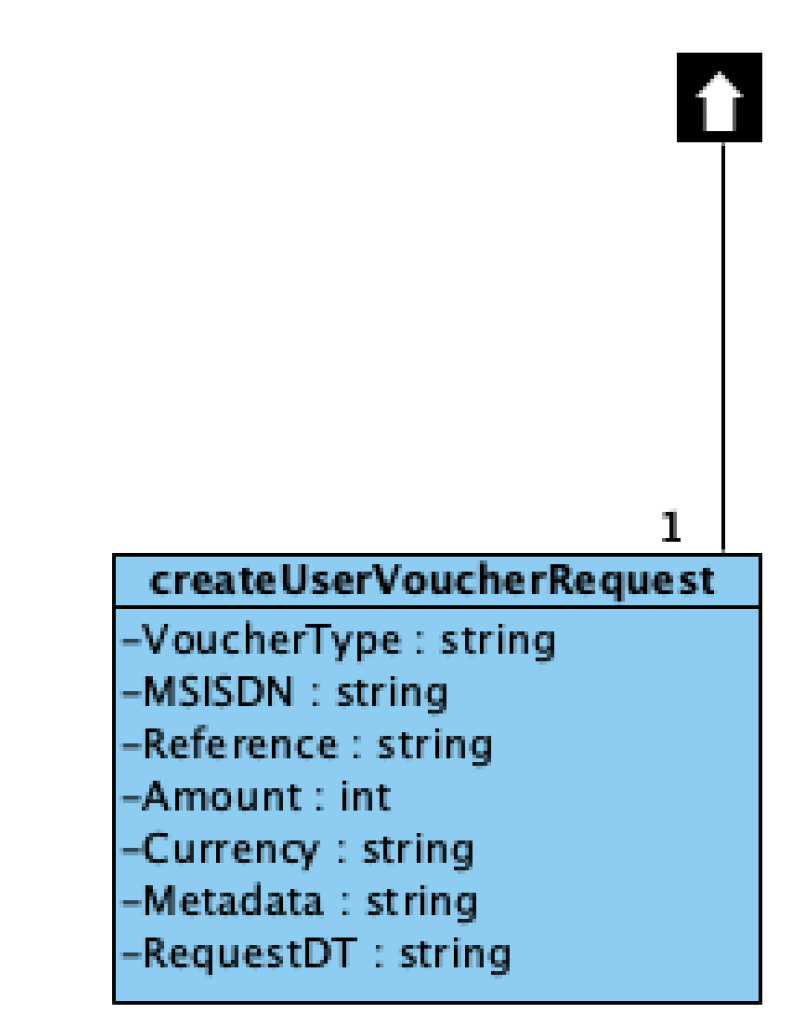
settleUserVoucherResponse
| Name | Type | Description |
| TID | string | TID (Transaction ID) of the executed transaction. Example: 12345678 |
| State | string | Transaction state. Example: Success, failed |
| Status | int | Transaction status. Example: 1 for success |
| Error | string | Failure reason if applicable as notated. Example: Invalid request |
Response Body
{
“TID”: “”,
“Status”: “”,
“State”: “”,
“Error”: “”
}
6 – transferToUser
Description
Sending money from one user to another user using their cell phone number.
Resource URL
transfertoUserRequest
| Name | Type | Description |
| Amount | int | Transaction amount in cents. Example: 2000 (R 20.00) |
| UserTo | string | Cellphone number receiving the voucher. Example: 27726721229 |
| Metadata | string | Any other detail that the merchant wishes to store on this transaction |
Request Header
Authorization: {{accesstoken}}
Content-Type: application/json
Request Body
transfertoUserResponse
| Name | Type | Description |
| TID | string | TID (Transaction ID) of the executed transaction. Example: 12345678 |
| State | string | Transaction state. Example: Success, failed |
| Status | int | Transaction status. Example: 1 for success |
| Error | string | Failure reason if applicable as notated. Example: Insufficient funds |
Response Body
{
“TID”: “9474139171”,
“Status”: “Success”,
“State”: “1”,
“Error”: “”
}
7 – viewUserBalance
Description
To view only the user’s cash balance.
Resource URL
https://{BaseURL}/viewUserBalance?ns={{namespace}}
viewUserBalanceRequest
| Name | Type | Description |
| Metadata | string | Any other detail that the merchant wishes to store on this transaction. |
Request Header
Authorization: {{accesstoken}}
Content-Type: application/json
Request Body
{
“Metadata”: “{\”ActionID\”: \”b37beb5b-e5d5-495c-8525-90b275ff4310\”}”
}
viewUserBalanceResponse
| Name | Type | Description |
| Balance | int | User’s account balance, amount in cents Example: 2000 (R 20.00) |
| Currency | string | Default is currency of merchant Example: ZAR (ISO 4217 Currency Codes) |
| Status | int |
Transaction status
Example: 1 for success |
| State | string |
Transaction state Example: 1 for success |
| Error | string | Failure reason if applicable as notated Example: Invalid Request |
Response Body
{
“Balance”: “98496”,
“Currency”: “ZAR”,
“Status”: “200”,
“State”: “Success”,
“Error”: “”
}
8 – viewUserTransactions
Description
To return a specified transaction type or all of a users’ transactions within a specified date range.
viewUserTransactionsRequest
| Name | Type | Description |
| DateFrom | string | Time from Example: 2018/01/01 12:00 |
| DateTo | string | Time to Example: 2018/01/02 16:00 |
| Limit | int | An Integer to limit the quantity of responses. Example: 100 |
| Metadata | string | Any other detail that the merchant wishes to store on this transaction. |
| Offset | int | An Integer to indicate the start index of the list. (Used to return additional records if Limit was used previously) Example: 100 |
| TransactionType | string | Options are All, Buy, Cash Out, Change, Commission, Deposit, EFT, EFT Reverse, Pay, Purchase, Receive, Reset, Reverse, Transfer, Voucher, Voucher Merchant or Withdraw |
Request Header
Authorization: {{accesstoken}}
Content-Type: application/json
Request Body
{
“DateFrom”: “2018/01/01 12:00”,
“DateTo”: “2018/07/01 12:00”,
“Limit”: “100”,
“Metadata”: “{\”ActionID\”: \”b37beb5b-e5d5-495c-8525-90b275ff4310\”}”,
“Offset”: “0”,
“TransactionType”: “All”
}
viewUserTransactionsResponse
| Name | Type | Description |
| TID | string | TID (Transaction ID) of the executed transaction Example: 12345678 |
| Date | string | Transaction date |
| Time | string | Transaction time |
| Limit | int | An Integer to limit the quantity of responses. Example: 100 |
| Offset | int | An Integer to indicate the start index of the list. (Used to return additional records if Limit was used previously) Example: 100 |
| TransactionType | string | Options are Trade, Deposit, Withdraw or all |
Response Body
{
“TransactionList”: [],
“State”: “Success”,
“Status”: “1”,
“Error”: “”
}
C) Merchant API
Introduction
The information described in this section is important to note to ensure the success of integration with the OAuth 2.0 Celbux calls.
Celbux supports only Authorization code (Grant Type) as their OAuth 2.0 strategy. The API’s published by Celbux are REST API’s that use simple HTTPS calls.
A Bearer Token will be allocated for a simulation environment, as well as a the URL specifically set-up for your dedicated use. This Bearer Token should be placed in the header of the REST Call under Authentication.
After successful completion of the simulation testing, new credentials will be supplied to you to permit operating in the live environment.
By default, all response and request payloads are in JSON format.
Celbux uses standard HTTP status codes when returning errors with additional fields in the body for the error name and code.
Environments
Environments
The environments listed below are for testing purposes only. Production environment details and user credentials will be shared once successful testing cycles have been concluded.
Simulation environment
The following details are to be used for testing in the simulation environment. The credentials marked with an * will be provided by Celbux. The customer and merchant password will be sent via SMS once the account has been created.
| Credential | Description |
| URL* | |
| Bearer Token* | |
| MEID* | |
| StoreID* | |
| Merchant Username* | |
| Merchant Password* | |
| Customer Username | |
| Customer Password* |
Simulation Testing Information
A test merchant and a test customer account will be activated on the simulation platform for your use. You can access your merchant and customer accounts via API.
In order to transact, you will need valid voucher numbers. You can use your customer account to create a voucher. On the Celbux system we have different voucher types that can only be spent at the merchants that are accredited to receive them. Cash vouchers can be spent at any merchant. There are other voucher types such as food, book, accommodation or transport vouchers. For these vouchers a merchant will need to be configured and accredited in order to accept the voucher when redeemed by a customer.
Cash vouchers will need to be created by the customer out of the cash balance available. Your test customer account will receive R 1 000 cash that can be topped up on request. After using a cash voucher, the change is put back into cash balance available and a new cash voucher needs to be created.
Basic Transactions
1 – Pay
Description
Executes a payment transaction where the money moves from a user’s wallet to a merchant wallet
Resource URL
PayRequest
| Name | Type | Description |
| VoucherNo | string | Source of the funds – a valid Celbux voucher number. Example: 225 00000 00000. |
| Reference | string | A unique transaction reference number given by the merchant. Example: 101 |
| Amount | int | Transaction amount in cents. Example: 2000 (R 20.00) |
| Currency | string | The currency of the merchant. Example: ZAR (ISO 4217 Currency Codes) |
| StoreID | string | A unique store identifier code. Example: 1234. |
| Metadata | string | Request date time for transaction. Example: 2017/08/10 12:00 |
Request Header
Authorization: {{bearertoken}}
Content-Type: application/json
Request Body
{
“VoucherNo”: “228-38777-05068”,
“Reference”: “”,
“Amount”: “100”,
“Currency”: “ZAR”,
“MEID”: “”,
“StoreID”: “56239”,
“Metadata”: “HPA1POS”,
“RequestDT”: “2013/01/01”
}
PayResponse
| Name | Type | Description |
| TID | string | TID (Transaction ID) of the executed payment response |
| Reference | string | A unique transaction reference number given by the merchant |
| Created | string | Transaction execution time |
| Amount | string | Transaction amount in cents |
| State | string | Transaction state |
| Status | Int | Transaction status |
| Error | string | Failure reason if applicable as notated |
Response Body
{
“TID”: “9626629171”,
“Reference”: “”,
“Created”: “2020/11/27 12:52”,
“Amount”: “100”,
“State”: “Success”,
“Status”: “1”,
“Error”: “”
}
2 – Withdraw
Description
The merchant executes a withdrawal transaction which moves the money from the user’s wallet to the merchant’s wallet.
Resource URL
WithdrawRequest
| Name | Type | Description |
| VoucherNo | string |
Source of the funds – a valid Celbux voucher number. Example: 225 00000 00000 |
| Reference | string |
A unique transaction reference number given by the merchant. Reference numbers must be unique identifiers otherwise an error will be returned by the system. Example: 101. |
| Amount | int |
Transaction amount in cents. Example: 2000 (R 20.00) |
| Currency | string |
The currency of the merchant.
Example: ZAR (ISO 4217 Currency Codes) |
| StoreID | string |
A unique store identifier code.
Example: 1234 |
| Metadata | string |
Any other detail that the merchant wishes to store on this transaction.
Example: Teller name |
Request Body
{
“VoucherNo”: “228-05931-71893”,
“Reference”: “”,
“Amount”: “150”,
“Currency”: “ZAR”,
“MEID”: “”,
“StoreID”: “56239”,
“Metadata”: “meta1”,
“RequestDT”: “2017/03/23”
}
WithdrawResponse
| Name | Type | Description |
| TID | string |
TID (Transaction ID) of the executed payment response.
Example: 1234-5678 |
| Reference | string |
A unique transaction reference number given by the merchant.
Example: 101. |
| Created | string |
Transaction execution time.
Example: 2017/08/10 12:00 |
| State | string |
Transaction state.
Example: Confirmed, Refunded |
| Status | int |
Transaction status.
Example: 1 for success. |
| Error | String |
Failure reason if applicable as noted.
Example: Insufficient funds. |
Response Body
{
“TID”: “9630149199”,
“Reference”: “”,
“Created”: “2020/11/28 06:05”,
“Amount”: “150”,
“State”: “Success”,
“Status”: “1”,
“Error”: “”
}
3 – Deposit
Description
The Merchant initiates a deposit transaction to the user’s/customer’s wallet.
Resource URL
DepositRequest
| Name | Type | Description |
| VoucherNo | string |
Destination of the funds – a valid Celbux bin with mobile number
Example: 225 00000 00000 |
| Reference | string |
A unique transaction reference number given by the merchant**
Example: 101 |
| Amount | int |
Transaction amount in cents
Example: 2000 (R 20.00) |
| Currency | string |
The currency of the merchant.
Example: ZAR (ISO 4217 Currency Codes) |
| StoreID | string |
A unique store identifier code
Example: 1234 |
| Metadata | string |
Any other detail that the merchant wishes to store on this transaction
Example: Teller name |
Request Header
Authorization: {{bearertoken}}
Content-Type: application/json
Request Body
{
“VoucherNo”: “228-2778800-8895”,
“Reference”: “”,
“Amount”: “10”,
“Currency”: “ZAR”,
“MEID”: “ZHQwXmR2QH8zMWFzb15eZnJR”,
“StoreID”: “”,
“Metadata”: “”,
“RequestDT”: “2020/11/30”
}
DepositResponse
| Name | Type | Description |
| TID | string |
TID (Transaction ID) of the executed payment response
Example: 1234-5678 |
| Reference | string |
A unique transaction reference number given by the merchant
Example: 101 |
| Created | string |
Transaction execution time
Example: 2017/08/10 12:00 |
| Amount | int |
Transaction amount in cents
Example: 2000 (R 20.00) |
| State | string |
Deposit state
Example: Success, Failed |
| Status | int |
Deposit status
Example: 1 for success |
| Error | string |
Failure reason if applicable as noted
Example: Unknown User |
Response Body
{
“TID”: “9684409193”,
“Reference”: “”,
“Created”: “2021/01/12 08:24”,
“Amount”: “10”,
“State”: “Success”,
“Status”: “1”,
“Error”: “”
}
4 – Confirm
Description
To confirm if a transaction has completed. This call can also be made to indicate a two-step confirmation of a transaction as per request. In the case of a two-step transaction, pass -1 to confirm and 0 to reverse.
Resource URL
ConfirmRequest
| Name | Type | Description |
| Metadata | string |
Any other detail that the merchant wishes to store on this transaction
Example: Teller name |
| Reference | string |
A unique transaction reference number given by the merchant.
Reference numbers must be unique identifiers otherwise an error will be returned by the system.
Example: 12345 |
| OldReference | string |
If a reference number is supplied, the reference number of the original transaction must also be supplied.
Either the TID or reference number must be supplied. If a reference number is supplied, the “OldReference” of the original transaction is also required.
Example: 12345 |
| TID | string |
TID (Transaction ID) of the executed payment response.
Either the TID or reference number must be supplied. If a reference number is supplied, the “OldReference” of the original transaction is also required.
Example: 1234-5678 |
| Amount | Int |
Enter a -1 to confirm or 0 to reverse
Example: -1 or 0 |
Request Header
Authorization: {{bearertoken}}
Content-Type: application/json
Request Body
{
“MEID”: “”,
“StoreID”: “56239”,
“Reference”: “”,
“OldReference”: “”,
“TID”: “9626629171”,
“Amount”: “-1”
}
ConfirmResponse
| Name | Type | Description |
| TID | string |
TID (Transaction ID) of the executed payment response
Example: 1234-5678 |
| Reference | string |
A unique transaction reference number given by the merchant
Example: 101 |
| OldReference | string |
The reference number given to the original transaction
Example: 101 |
| Created | string |
Transaction execution time.
Example: 2017/08/10 12:00 |
| State | string |
Transaction state.
Example: Confirmed, Refunded |
| Status | int |
Transaction status.
Example: 1 for success. |
| Error | string |
Failure reason if applicable as noted
Example: Insufficient funds. |
Response Body
{
“TID”: “9626629171”,
“Reference”: “”,
“OldReference”: “”,
“Created”: “2020/11/27 13:22”,
“State”: “Confirmed”,
“Status”: “1”,
“Error”: “”
}
5 – Payment
Description
Pass the StoreID and the payment TID to retrieve details about an individual pay transaction.
Resource URL
PaymentRequest
| Name | Type | Description |
| StoreID | string |
A unique store identifier code.
Example: 123 |
| TID | string |
TID (Transaction ID) of the executed payment response.
Either the TID or reference number must be supplied. If a reference number is supplied, the “OldReference” of the original transaction is also required.
Example: 1234-5678 |
| Metadata | string |
Any other detail that the merchant wishes to store on this transaction
Example: Teller name |
Request Body
|
{ “TID”: “”, “StoreID”: “Celbux”, “Metadata”: “{\”ActionID\”: \”b37beb5b-e5d5-495c-8525-90b275ff4310\”}” } |
PaymentResponse
| Name | Type | Description |
| TID | string |
TID (Transaction ID) of the executed payment response.
Example: 1234-5678 |
| Reference | string |
A unique transaction reference number given by the merchant.
Example: 101 |
| Created | string |
Transaction execution time.
Example: 2017/08/10 12:00 |
| Amount | int |
Transaction amount in cents.
Example: 2000 (R 20.00) |
| State | string |
Transaction state.
Example: Success, Failed |
| Status | int |
Transaction status.
Example: 1 for success |
| Error | string |
Failure reason if applicable as notated.
Example: Insufficient funds |
Response Body
|
{ “TID”: “9636209172”, “Reference”: “”, “Created”: “2020/12/01 17:23”, “Amount”: “250”, “State”: “Success”, “Status”: “1”, “Error”: “” } |
D) Administrative API
1 - Introduction
The information described in this section is important to ensure successful integration with the Celbux Administrative API calls.
The Celbux API is a REST API that uses simple HTTP calls. This document describes various API calls to the Celbux platform.
API access to the Celbux platform requires a valid bearer token and an active URL endpoint. The URL endpoint has to be part of the POST or GET call structure and is inserted at the place holder {URL} on the calls in this document. The bearer token is used to authenticate API calls to the platform, and it should be placed in the header of the call under Authorization.
A simulation platform, consisting of a bearer token and URL endpoint, will be made available to you for testing basic connectivity to the platform. To test the API, the {Base URL} in the call needs to be changed to the simulation URL.This will enable you to test the API calls as specified to ensure that all of these are functional. Credentials will include a bearer token, URL endpoint, test merchant and test customer.
After successful completion of the simulation testing, new credentials will be supplied to you to permit operating in the live environment.
By default, all response and request payloads are in JSON format.
Celbux uses standard HTTP status codes when returning errors with additional fields in the body for the error description and code.
2 – Environments
Environments
The environments listed below are for testing purposes only. Production environment details and user credentials will be shared once successful testing cycles have been concluded.
Simulation environment
The following details are to be used for testing in the simulation environment. The credentials marked with an * will be provided by Celbux. The customer and merchant password will be sent via SMS once the account has been created.
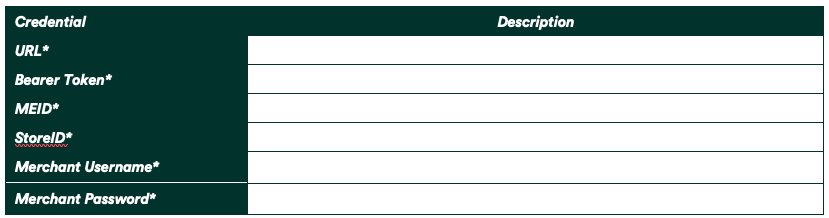
1 – Add Users to Communities
Description
Add users and merchants account to communities
Resource URL
https://{BaseURL}/addUsersToCommunities?ns={{namespace}}
addUsersToCommunities Request
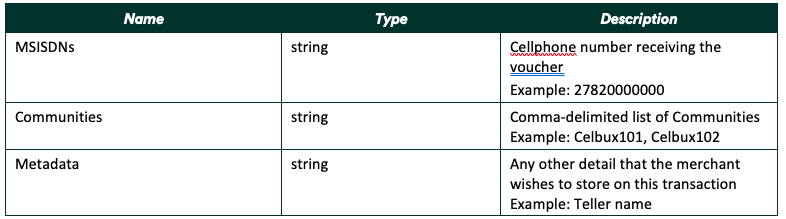
Request Header
Authorization: {{bearertoken}}
Content-Type: application/json
Request Body
{
“MSISDNs”: “Merchant1”,
“Communities”: “celbux101”,
“Metadata”: “{\”ActionID\”: \”b37beb5b-e5d5-495c-8525-90b275ff4310\”}”
}
addUsersToCommunities Response
| Name | Type | Description |
| TID | string |
TID (Transaction ID) of the executed API call Example: 1234-5678 |
| State | string |
Transaction state. Example: Confirmed, Refunded |
| Status | Int |
Transaction status. Example: 1 for success. |
| Error | string |
Failure reason if applicable as noted. Example: Insufficient funds. |
Response Body
|
{ “TID”: “9626629171”, “State”: “Success”, “Status”: “1”, “Error”: “” } |
2 – Change MSISDN
Description
Use this call to Change Mobile Number
Resource URL
changeMSISDN Request
| Name | Type | Description |
|
ID Number
|
string |
RSA ID number 13 digit
|
|
OldMSISDN
|
String |
Old Mobile number
|
| Reference | string |
A unique transaction reference number given by the merchant. Reference numbers must be unique identifiers otherwise an error will be returned by the system. Example: 101. |
|
NewMSISDN
|
string |
New Mobile number
|
|
Metadata
|
string |
Any other detail that the merchant wishes to store on this transaction. Example: Teller name |
| OTP | String | One Time Pin number |
Request Header
|
Authorization: {{bearertoken}} Content-Type: application/json |
Request Body
|
{ “OldMSISDN”: “0648503047”, “IDNumber”: “”, “NewMSISDN”: “0648503049”, “OTP”: “437147”, “Reference”: “{{$timestamp}}”, “Metadata”: “{\”ActionID\”: \”b37beb5b-e5d5-495c-8525-90b275ff4310\”}” } |
changeMSISDN Response
| Name | Type | Description |
| TID | string |
TID (Transaction ID) of the executed API call
Example: 1234-5678 |
| Reference | string |
A unique transaction reference number given by the merchant.
Example: 101. |
| State | string |
Transaction state.
Example: Confirmed, Refunded |
| Status | int |
Transaction status.
Example: 1 for success. |
| Error | String |
Failure reason if applicable as noted.
Example: Insufficient funds. |
Response Body
|
{ “TID”: “9630149199”, “Reference”: ” 1707385761″, “State”: “Success”, “Status”: “1”, “Error”: “” } |
3 – Create Bearer Token
Description
To create a Bearer Token on the platform
Resource URL
createBearerToken Request
| Name | Type | Description |
| BearerToken | string |
Security token used for API authentication Example: Ty574u9vfBnYY54592jfl5474 |
| Title | string |
Unique name of the Bearer Token
|
| Expiry | String | Expiry date and time |
| Metadata | string |
Any other detail that the merchant wishes to store on this transaction Example: Teller name |
Request Header
|
Authorization: {{bearertoken}} Content-Type: application/json |
Request Body
|
{ “BearerToken”: “jM3hxb7BVaDsl5RqRf8qsSdOPJWKh1PEIcgmAHAbyXg=”, “Title”: “Celbux International”, “Expiry”: “”, // leave blank for no expiry “Metadata”: “{\”ActionID\”: \”b37beb5b-e5d5-495c-8525-90b275ff4310\”}” } |
createBearerToken Response
| Name | Type | Description |
| TID | string |
TID (Transaction ID) of the executed API call Example: 1234-5678 |
| State | string |
Transaction state Example: Success, Failed |
| Status | int |
Transaction status Example: 1 for success |
| Error | string |
Failure reason if applicable as noted Example: Unknown User |
Response Body
|
{ “TID”: “9684409193”, “State”: “Success”, “Status”: “1”, “Error”: “” } |
4 – Create Merchant Route
Description
To create a merchant route between communities
createMerchantRoute Request
| Name | Type | Description |
| BearerToken | string |
Security token used for authentication Example: Ty574u9vfBnYY54592jfl5474 |
| StoreID | string |
A unique store identifier code Example: 12345 |
| VoucherPrefix | string |
Voucher prefix number Example: 355 |
| Route | String | Community URL |
| Metadata | string |
Any other detail that the merchant wishes to store on this transaction Example: Teller name |
Request Header
|
Authorization: {{bearertoken}} Content-Type: application/json |
Request Body
|
{ “BearerToken”: “jM3hxb7BVaDsl5RqRf8qsSdOPJWKh1PEIcgmAHAbyXg=”, “StoreID”: “Celbux”, “VoucherPrefix”: “335”, “Route”: “https://dev1celbux.appspot.com”, “Metadata”: “{\”ActionID\”: \”b37beb5b-e5d5-495c-8525-90b275ff4310\”}” } |
createMerchantRoute Response
| Name | Type | Description |
| TID | string |
TID (Transaction ID) of the executed API call Example: 1234-5678 |
| State | string |
Transaction state. Example: Confirmed, Refunded |
| Status | int |
Transaction status. Example: 1 for success. |
| Error | string |
Failure reason if applicable as noted Example: Insufficient funds. |
Response Body
|
{ “TID”: “9626629171”, “State”: “Confirmed”, “Status”: “1”, “Error”: “” } |
5 – Create Merchant Store
Description
To create a merchant store account
createMerchantStore Request
| Name | Type | Description |
| BearerToken | string |
Security token used for authentication Example: Ty574u9vfBnYY54592jfl5474 |
| StoreID | string |
A unique store identifier code Example: 12345 |
| Merchant | string | Merchant name |
| Metadata | string |
Any other detail that the merchant wishes to store on this transaction Example: Teller name |
Request Header
|
Authorization: {{bearertoken}} Content-Type: application/json |
Request Body
|
{ “BearerToken”: “jM3hxb7BVaDsl5RqRf8qsSdOPJWKh1PEIcgmAHAbyXg=”, “Merchant”: “Merchant1”, “StoreID”: “Store1”, “Metadata”: “{\”ActionID\”: \”b37beb5b-e5d5-495c-8525-90b275ff4310\”}” } |
createMerchantStore Response
| Name | Type | Description |
| TID | string |
TID (Transaction ID) of the executed API call Example: 1234-5678 |
| State | string |
Transaction state. Example: Confirmed, Refunded |
| Status | int |
Transaction status. Example: 1 for success. |
| Error | string |
Failure reason if applicable as noted Example: Insufficient funds. |
Response Body
|
{ “TID”: “9626629171”, “State”: “Confirmed”, “Status”: “1”, “Error”: “” } |
6 – Create OAuth Client
Description
To create client ID for Oauth API Integration
Resource URL
createOAuthClient Request
| Name | Type | Description |
| ClientID | string | The ClientID is a public identifier for apps |
| Expiry | string | Access Token expiring date |
| Merchant | string | Merchant name |
| Scope | string |
The scope of the access request Example: read, write |
| Secret | string | The client secret is a secret known only to the application and the authorization server. |
| Whitelist | string | Access control list |
| Metadata | string |
Any other detail that the merchant wishes to store on this transaction Example: Teller name |
Request Header
|
Authorization: {{bearertoken}} Content-Type: application/json |
Request Body
|
{ “ClientID”: “Client1”, “Expiry”: “3600”, “Merchant”: “Merchant1”, “Scope”: “root:all”, “Secret”: “8vxnURAWj0RIbrck6z85DkC8RwtWnmuekFyz18epYRNoiXSpxNh”, “Whitelist”: “*”, // comma-delimited list “Metadata”: “{\”ActionID\”: \”b37beb5b-e5d5-495c-8525-90b275ff4310\”}” } |
createOAuthClient Response
| Name | Type | Description |
| TID | string |
TID (Transaction ID) of the executed API call Example: 1234-5678 |
| State | string |
Transaction state. Example: Success, Failed |
| Status | int |
Transaction status. Example: 1 for success |
| Error | string |
Failure reason if applicable as notated. Example: Insufficient funds |
Response Body
|
{ “TID”: “9636209172”, “State”: “Success”, “Status”: “1”, “Error”: “” } |
7 – Create User
Description
To create an user account on the platform
Resource URL
createUser Request
| Name | Type | Description |
| Username | string | Name used for customer’s identification |
| IDNumber | string | RSA ID number 13 digit |
| Merchant | string | Merchant name |
| KYC | string | Know Your Customer (KYC) limit |
| Status | string |
KYC status Example: ‘Open’, ‘Blocked’ or ‘Closed’ |
| DisplayName | string | How customer’s name is known in the platform |
| FirstName | string | Customer’s first name |
| LastName | String | Customer’s last name |
| MSISDN | string | Customer’s mobile number |
| string | Customer’s account | |
| Currency | string | Default currency of merchant Example: ZAR (ISO 4217 Currency Codes) |
| HouseNumber | string | Customer’s home number |
| StreetName | string | Customer’s street number |
| Suburb | string | Customer’s Suburb name |
| Town | string | Customer’s city name |
| Province | string | Customer’s province name |
| AccountName | string | Customer’s bank account display name |
| AccountNumber | string | Customer’s bank account number |
| AccountType | string | Customer’s bank account type |
| BankName | string | Bank name |
| BranchCode | string | Bank branch code |
| Commission | string | Commission rate fee |
| CommercialRegistrationNumber | string | Commercial Registration number |
| TaxNumber | string | SARS tax number |
| Metadata | string |
Any other detail that the merchant wishes to store on this transaction Example: Teller name |
Request Header
|
Authorization: {{bearertoken}} Content-Type: application/json |
Request Body
|
{ // User “Username”: “Merchant1”, “IDNumber”: “”, “KYC”: “0”, // ‘0’ (no limits) or ‘1’ (limits) “Status”: “Open”, // ‘Open’, ‘Blocked’ or ‘Closed’ // Personal “DisplayName”: “Store Centurion”, “FirstName”: “John”, “LastName”: “Mercantile”, “MSISDN”: “0648503047”, “Email”: “john@mercantile.com”, “Currency”: “ZAR”, // Address “HouseNumber”: “101”, “StreetName”: “Clark Ave”, “Suburb”: “Centurion”, “Town”: “Pretoria”, “Province”: “Gauteng”, // Bank “AccountName”: “MR J M”, “AccountNumber”: “6288854619854”, “AccountType”: “Savings”, “BankName”: “FNB”, “BranchCode”: “265005”, // Commercial “Commission”: “3.0”, “CommercialRegistrationNumber”: “754189057”, “TaxNumber”: “255700077”, “Metadata”: “{\”ActionID\”: \”b37beb5b-e5d5-495c-8525-90b275ff4310\”}” } |
createUser Response
| Name | Type | Description |
| TID | string |
TID (Transaction ID) of the executed API call Example: 1234-5678 |
| Reference | string |
A unique transaction reference number given by the merchant. Example: 101 |
| State | string |
Transaction state. Example: Success, Failed |
| Status | int |
Transaction status. Example: 1 for success |
| Error | string |
Failure reason if applicable as notated. Example: Insufficient funds |
Response Body
|
{ “TID”: “9636209172”, “Reference”: “1707385761”, “Created”: “2020/12/01 17:23”, “Amount”: “250”, “State”: “Success”, “Status”: “1”, “Error”: “” } |
8 – Create Voucher
Description
This call is used to create a single voucher and disburse to a user.
Resource URL
CreateVoucherRequest
| Name | Type | Description |
| VoucherType | string |
Name of the voucher type Example: Book, Cash |
| MSISDN | string | Cellphone number receiving the voucher Example: 27820000000 |
| Reference | string | A unique transaction reference number given by the merchant** Example: 101 |
| Amount | int | Transaction amount in cents Example: 2000 (R 20.00) |
| Currency | string | Default is currency of merchant Example: ZAR (ISO 4217 Currency Codes) |
| StoreID | string |
A unique store identifier code – Source of the funds Example: 12345 |
| Metadata | string | Any other detail that the merchant wishes to store on this transaction Example: Teller name |
Request Header
|
Authorization: {{bearertoken}} Content-Type: application/json |
Request Body
|
{ “Amount”: “10000”, “Currency”: “ZAR”, “MSISDN”: “Merchant1”, “StoreID”: “Celbux”, “VoucherType”: “Book”, “Reference”: “{{$timestamp}}”, “Metadata”: “{\”ActionID\”: \”b37beb5b-e5d5-495c-8525-90b275ff4310\”}” } |
CreateVoucher Response
| Name | Type | Description |
| TID | String |
TID (Transaction ID) of the executed API call Example: 1234-5678 |
| VoucherNo | string |
A valid voucher number Example: 228 00000 00000 |
| VID | String | Voucher ID. Example: 2628857436 |
| Reference | string | A unique transaction reference number given by the merchant Example: 101 |
| Created | string |
Transaction execution time Example: 2013/01/01 12:00 |
| Amount | int | Transaction amount in cents Example: 2000 (R 20.00) |
| State | string |
Transaction state Example: Success, failed |
| Status | int |
Transaction status Example: 1 for success |
| Error | string | Failure reason if applicable as notated Example: Insufficient funds |
Response Body
|
{ “VoucherNo”: “”, “Reference”: “1629965167”, “Created”: “2021/08/26 08:06”, “Amount”: “1000”, “State”: “Success”, “Status”: “1”, “Error”: “”, “VID”: “2628857436”, “TID”: “9804699185” } |
9 – CreateVoucherType
Description
This call is used to create a voucher type.
Resource URL
CreateVoucherRequest
| Name | Type | Description |
| AutoLock | string |
Controls whether the voucher is relocked automatically on-spend Example: 1 or empty field |
| Locked | string |
Controls whether new vouchers are locked by default Example: 1 or empty field |
| PIN | string | Any value; The PIN of the voucher must be empty to spend, via /updateVoucher (meaning PIN validation must be done externally before clearing it via API) |
| ThirdParty | int | Any value (usually MSISDN); The ThirdPartyClear field of the voucher must match the value placed here, via /updateVoucher |
| VAccumulate | string |
Controls whether new vouchers of this type are accumulated, or created standalone alongside each other Example: 1 or empty field |
| VMetadata | The transaction must NOT include alcohol anywhere, and must contain merchant_name somewhere | |
| VoucherType |
Name of the voucher type Example: Book, Cash |
|
| VSettle |
Controls whether the voucher can be settled into the user’s cash balance Example: 1 or empty field |
|
| WithdrawFee | string |
Amount in cents that it costs to withdraw this voucher as cash Example: 900 |
| Metadata | string | Any other detail that the merchant wishes to store on this transaction Example: Teller name |
Request Header
|
Authorization: {{bearertoken}} Content-Type: application/json |
Request Body
|
{ “AutoLock”: “”, “Locked”: “”, “PIN”: “”, “ThirdParty”: “VAccumulate”: “1”, “VMetadata”: “Contains![alcohol] Contains[merchant_name]”, “VoucherType”: “Book”, “VSettle”: “”, “WithdrawFee”: “900”, “Metadata”: “{\”ActionID\”: \”b37beb5b-e5d5-495c-8525-90b275ff4310\”}” } |
CreateVoucherType Response
| Name | Type | Description |
| TID | string |
TID (Transaction ID) of the executed API call Example: 1234-5678 |
| State | string |
Transaction state Example: Success, failed |
| Status | int |
Transaction status Example: 1 for success |
| Error | string | Failure reason if applicable as notated Example: Insufficient funds |
Response Body
|
{ “State”: “Success”, “Status”: “1”, “Error”: “”, “TID”: “9804699185” } |
10 – Link Merchant
Description
This call is used to link a voucher type to a merchant account
Resource URL
linkMerchant Request
| Name | Type | Description |
| Merchant | string | Merchant name |
| VoucherType | string |
Name of the voucher type Example: Book, Cash |
| Metadata | string | Any other detail that the merchant wishes to store on this transaction Example: Teller name |
Request Header
|
Authorization: {{bearertoken}} Content-Type: application/json |
Request Body
|
{ “Merchant”: “Merchant1”, “VoucherType”: “Flash”, “Metadata”: “{\”ActionID\”: \”b37beb5b-e5d5-495c-8525-90b275ff4310\”}” } |
LinkMerchant Response
| Name | Type | Description |
| TID | int |
TID (Transaction ID) of the executed API call Example: 1234-5678 |
| State | string | Transaction state Example: Success, failed |
| Status | int | Transaction status Example: 1 for success |
| Error | string | Failure reason if applicable as notated Example: Insufficient funds |
Response Body
|
{ “TID”: “9804699185” “State”: “Success”, “Status”: “1”, “Error”: “”, } |
11 – Read Action History
Description
This call is used to read actions that succeeded on the platform.
actionhistory/read Request
| Name | Type | Description |
| ActionID | string | Piece of data populated into API call’s metadata |
| DateFrom | string |
Time from. Example Values: 2018/01/01 12:00 |
| DateTo | string |
Time to. Example Values: 2018/01/02 16:00 |
| Limit | inr | An Integer to limit the quantity of responses. |
Request Header
|
Authorization: {{bearertoken}} Content-Type: application/json |
Request Body
|
{ “ActionID”: “user~0648503047”, “DateFrom”: “”, “DateTo”: “”, “Limit”: 0 } |
actionhistory/read Response
| Name | Type | Description |
| TID | int |
TID (Transaction ID) of the executed API call Example: 1234-5678 |
| State | string |
Transaction state Example: Success, failed |
| Status | int |
Transaction status Example: 1 for success |
| Error | string | Failure reason if applicable as notated Example: Insufficient funds |
Response Body
|
{ “TID”: “9804699185”, “State”: “Success”, “Status”: “1”, “Error”: “” } |
12 – Remove Users from Communities
Description
This call is used to remove users’ accounts from one or more communities
removeUsersFromCommunities Request
| Name | Type | Description |
| MSISDNs | string | List of user accounts |
| Communities | string | List of communities |
| Metadata | string | Any other detail that the merchant wishes to store on this transaction Example: Teller name |
Request Header
|
Authorization: {{bearertoken}} Content-Type: application/json |
Request Body
|
{ “MSISDNs”: “Merchant1”, // comma-delimited list “Communities”: “celbux101”, // comma-delimited list “Metadata”: “{\”ActionID\”: \”b37beb5b-e5d5-495c-8525-90b275ff4310\”}” } |
removeUsersFromCommunities Response
| Name | Type | Description |
| TID | int |
TID (Transaction ID) of the executed API call Example: 1234-5678 |
| State | string |
Transaction state Example: Success, failed |
| Status | int |
Transaction status Example: 1 for success |
| Error | string | Failure reason if applicable as notated Example: Insufficient funds |
Response Body
|
{ “TID”: “9804699185”, “State”: “Success”, “Status”: “1”, “Error”: “”, } |
13 – Reset Password
6.10 Description
This call is used to reset the user’s password
6.11 Resource URL
6.12 ResetPassword Request
|
Name |
Type |
Description |
|
MSISDN |
string |
Customer’s mobile number |
|
IDNumber |
string |
RSA ID number 13 digit |
|
OTP |
string |
One Time Pin number |
|
Reference |
string |
A unique transaction reference number given by the merchant |
|
Metadata |
string |
Any other detail that the merchant wishes to store on this transaction Example: Teller name |
6.12.1 Request Header
|
Authorization: {{bearertoken}} Content-Type: application/json |
6.12.2 Request Body
|
{ “MSISDN”: “27648503049”, “IDNumber”: “0107255802087”, “OTP”: “602734”, “Reference”: “{{$timestamp}}”, “Metadata”: “{\”ActionID\”: \”b37beb5b-e5d5-495c-8525-90b275ff4310\”}” } |
6.13 ResetPassword Response
|
Name |
Type |
Description |
|
TID |
string |
TID (Transaction ID) of the executed API call Example: 1234-5678 |
|
Reference |
string |
A unique transaction reference number given by the merchant Example: 101 |
|
State |
string |
Transaction state Example: Success, failed |
|
Status |
int |
Transaction status Example: 1 for success |
|
Error |
string |
Failure reason if applicable as notated Example: Insufficient funds |
6.13.1 Response Body
|
{ “TID”: “9804699185” “Reference”: “1629965167”, “State”: “Success”, “Status”: “1”, “Error”: “” } |
14 – Send OTP
Description
This call is used to send the OTP to complete the reset password API and change MSISDN API call
Resource URL
sendOTP Request
| Name | Type | Description |
| MSISDN | string | Customer’s mobile number |
| IDNumber | string | RSA ID number 13 digit |
| NewMSISDN | string | Customer’s new Mobile number |
| Reference | string | A unique transaction reference number given by the merchant |
| Metadata | string | Any other detail that the merchant wishes to store on this transaction Example: Teller name |
Request Header
|
Authorization: {{bearertoken}} Content-Type: application/json |
Request Body
|
{ “OldMSISDN”: “0648503047”, “IDNumber”: “”, “NewMSISDN”: “0648503049”, “OTP”: “437147”, “Reference”: “{{$timestamp}}”, “Metadata”: “{\”ActionID\”: \”b37beb5b-e5d5-495c-8525-90b275ff4310\”}” } |
SendOtp Response
| Name | Type | Description |
| TID | string |
TID (Transaction ID) of the executed API call Example: 1234-5678 |
| Reference | string | A unique transaction reference number given by the merchant Example: 101 |
| State | string |
Transaction state Example: Success, failed |
| Status | int |
Transaction status Example: 1 for success |
| Error | string | Failure reason if applicable as notated Example: Insufficient funds |
Response Body
|
{ “TID”: “9804699185” “Reference”: “1629965167”, “State”: “Success”, “Status”: “1”, “Error”: “” } |
15 – Unlink Merchant
Description
This call is used to unlink a voucher type to a merchant account
Resource URL
UnlinkMerchant Request
| Name | Type | Description |
| Merchant | string | Merchant name |
| VoucherType | string |
Name of the voucher type Example: Book, Cash |
| Metadata | string | Any other detail that the merchant wishes to store on this transaction Example: Teller name |
Request Header
|
Authorization: {{bearertoken}} Content-Type: application/json |
Request Body
|
{ “Merchant”: “Merchant1”, “VoucherType”: “Flash”, “Metadata”: “{\”ActionID\”: \”b37beb5b-e5d5-495c-8525-90b275ff4310\”}” } |
linkMerchant Response
| Name | Type | Description |
| TID | string |
TID (Transaction ID) of the executed API call Example: 1234-5678 |
| State | string |
Transaction state Example: Success, failed |
| Status | int |
Transaction status Example: 1 for success |
| Error | string | Failure reason if applicable as notated Example: Insufficient funds |
Response Body
|
{ “TID”: “9804699185”, “State”: “Success”, “Status”: “1”, “Error”: “” } |
16 – Update Actor Auth
Description
This call is used to updates each TT property with the specified comma-delimited groups.
Resource URL
updateActorAuth Request
| Name | Type | Description |
| Actor | string | Either user MSISDN; bearer Token; or oauth ClientID |
| Metadata | string | Any other detail that the merchant wishes to store on this transaction Example: Teller name |
|
TT0, TT1, TT2, TT3, TT4, TT5, TT6, TT7, TT8, TT9, TT10, TT11, TT12, TT13, TT14, TT15, TT16, TT17, TT18, TT19, TT20, TT21, TT22, TT23, TT24, TT25, TT26, TT27, TT28, TT29, TT30, TT31, TT32, TT1000, TT1100, TT1200, TT1300, TT1400, TT1500, TT1600, TT1700, TT1800, TT1900, TT2000, TT2001, TT2002, TT2003, TT2004, TT2005, TT2006, TT2007, TT2008, TT2009, TT2010, TT2011, TT2012, TT2013, TT2014, TT2015, TT2016, TT2017, TT2018, TT2019, TT2020, TT2021, TT2022, TT2023, TT2024, TT2025, TT2026, TT2027, TT2028, TT2029, TT2030, TT2031, TT2032, TT2033, TT2034, TT2035, TT2036, TT2037, TT2038, TT2039, TT2040, TT2041, TT2042, TT2043, TT2044, TT2045, TT2046, TT2047, TT2048, TT3000, TT3001, TT3002, TT3003, TT3004, TT3005, TT3006, TT3007, TT3008, TT3009, TT3010, TT3011, TT3012, TT3013, TT3014, TT3015, TT3016, TT3017, TT3018, TT3019, TT2049, |
String | All Transaction Type (TT) fields are comma-delimited lists of communities |
Request Header
|
Authorization: {{bearertoken}} Content-Type: application/json |
Request Body
|
{ “Actor”: “bearer~{{celbux-bearer-token}}”, “Metadata”: “{\”ActionID\”: \”b37beb5b-e5d5-495c-8525-90b275ff4310\”}”, “TT0”: “celbux101”, “TT1”: “celbux101”, “TT2”: “celbux101”, “TT3”: “celbux101”, “TT4”: “celbux101”, “TT5”: “celbux101”, “TT6”: “celbux101”, “TT7”: “celbux101”, “TT8”: “celbux101”, “TT9”: “celbux101”, “TT10”: “celbux101”, “TT11”: “celbux101”, “TT12”: “celbux101”, “TT13”: “celbux101”, “TT14”: “celbux101”, “TT15”: “celbux101”, “TT16”: “celbux101”, “TT17”: “celbux101”, “TT18”: “celbux101”, “TT19”: “celbux101”, “TT20”: “celbux101”, “TT21”: “celbux101”, “TT22”: “celbux101”, “TT23”: “celbux101”, “TT24”: “celbux101”, “TT25”: “celbux101”, “TT26”: “celbux101”, “TT27”: “celbux101”, “TT28”: “celbux101”, “TT29”: “celbux101”, “TT30”: “celbux101”, “TT31”: “celbux101”, “TT32”: “celbux101”, “TT1000”: “celbux101”, “TT1100”: “celbux101”, “TT1200”: “celbux101”, “TT1300”: “celbux101”, “TT1400”: “celbux101”, “TT1500”: “celbux101”, “TT1600”: “celbux101”, “TT1700”: “celbux101”, “TT1800”: “celbux101”, “TT1900”: “celbux101”, “TT2000”: “celbux101”, “TT2001”: “celbux101”, “TT2002”: “celbux101”, “TT2003”: “celbux101”, “TT2004”: “celbux101”, “TT2005”: “celbux101”, “TT2006”: “celbux101”, “TT2007”: “celbux101”, “TT2008”: “celbux101”, “TT2009”: “celbux101”, “TT2010”: “celbux101”, “TT2011”: “celbux101”, “TT2012”: “celbux101”, “TT2013”: “celbux101”, “TT2014”: “celbux101”, “TT2015”: “celbux101”, “TT2016”: “celbux101”, “TT2017”: “celbux101”, “TT2018”: “celbux101”, “TT2019”: “celbux101”, “TT2020”: “celbux101”, “TT2021”: “celbux101”, “TT2022”: “celbux101”, “TT2023”: “celbux101”, “TT2024”: “celbux101”, “TT2025”: “celbux101”, “TT2026”: “celbux101”, “TT2027”: “celbux101”, “TT2028”: “celbux101”, “TT2029”: “celbux101”, “TT2030”: “celbux101”, “TT2031”: “celbux101”, “TT2032”: “celbux101”, “TT2033”: “celbux101”, “TT2034”: “celbux101”, “TT2035”: “celbux101”, “TT2036”: “celbux101”, “TT2037”: “celbux101”, “TT2038”: “celbux101”, “TT2039”: “celbux101”, “TT2040”: “celbux101”, “TT2041”: “celbux101”, “TT2042”: “celbux101”, “TT2043”: “celbux101”, “TT2044”: “celbux101”, “TT2045”: “celbux101”, “TT2046”: “celbux101”, “TT2047”: “celbux101”, “TT2048”: “celbux101”, “TT3000”: “celbux101”, “TT3001”: “celbux101”, “TT3002”: “celbux101”, “TT3003”: “celbux101”, “TT3004”: “celbux101”, “TT3005”: “celbux101”, “TT3006”: “celbux101”, “TT3007”: “celbux101”, “TT3008”: “celbux101”, “TT3009”: “celbux101”, “TT3010”: “celbux101”, “TT3011”: “celbux101”, “TT3012”: “celbux101”, “TT3013”: “celbux101”, “TT3014”: “celbux101”, “TT3015”: “celbux101”, “TT3016”: “celbux101”, “TT3017”: “celbux101”, “TT3018”: “celbux101”, “TT3019”: “celbux101” } |
updateActorAuth Response
| Name | Type | Description |
| TID | string |
TID (Transaction ID) of the executed API call Example: 1234-5678 |
| State | string |
Transaction state Example: Success, failed |
| Status | int |
Transaction status Example: 1 for success |
| Error | string | Failure reason if applicable as notated Example: Insufficient funds |
Response Body
|
{ “TID”: “9804699185”, “State”: “Success”, “Status”: “1”, “Error”: “” } |
17 – Update User
Description
This call is used to update the users’ details
Resource URL
updateUser Request
updateUser Request
| Name | Type | Description |
| Username | string | Name used for customer’s identification |
| IDNumber | string | RSA ID number 13 digit |
| Merchant | string | Merchant name |
| KYC | string | Know Your Customer (KYC) limit |
| Status | string |
KYC status Example: ‘Open’, ‘Blocked’ or ‘Closed’ |
| DisplayName | string | How customer’s name is known in the platform |
| FirstName | string | Customer’s first name |
| LastName | String | Customer’s last name |
| MSISDN | string | Customer’s mobile number |
| string | Customer’s account | |
| Currency | string | Default currency of merchant Example: ZAR (ISO 4217 Currency Codes) |
| HouseNumber | string | Customer’s home number |
| StreetName | string | Customer’s street number |
| Suburb | string | Customer’s Suburb name |
| Town | string | Customer’s city name |
| Province | string | Customer’s province name |
| AccountName | string | Customer’s bank account display name |
| AccountNumber | string | Customer’s bank account number |
| AccountType | string | Customer’s bank account type |
| BankName | string | Bank name |
| BranchCode | string | Bank branch code |
| Commission | string | Commission rate fee |
| CommercialRegistrationNumber | string | Commercial Registration number |
| TaxNumber | string | SARS tax number |
| Metadata | string |
Any other detail that the merchant wishes to store on this transaction Example: Teller name |
Request Header
|
Authorization: {{bearertoken}} Content-Type: application/json |
Request Body
|
{ // User “Username”: “Merchant1”, “IDNumber”: “”, “KYC”: “”, “Status”: “”, // Personal “DisplayName”: “”, “FirstName”: “”, “LastName”: “”, “MSISDN”: “”, “Email”: “”, “Currency”: “”, // Address “HouseNumber”: “”, “StreetName”: “”, “Suburb”: “”, “Town”: “”, “Province”: “”, // Bank “AccountName”: “”, “AccountNumber”: “”, “AccountType”: “”, “BankName”: “”, “BranchCode”: “”, // Commercial “Commission”: “”, “CommercialRegistrationNumber”: “”, “TaxNumber”: “”, “Metadata”: “{\”ActionID\”: \”b37beb5b-e5d5-495c-8525-90b275ff4310\”}” } |
updateUser Response
| Name | Type | Description |
| TID | string |
TID (Transaction ID) of the executed API call Example: 1234-5678 |
| State | string |
Transaction state Example: Success, failed |
| Status | int |
Transaction status Example: 1 for success |
| Error | string | Failure reason if applicable as notated Example: Insufficient funds |
Response Body
|
{ “TID”: “9804699185”, “State”: “Success”, “Status”: “1”, “Error”: “” } |
18 – Update Voucher Type
Description
This call is used to update a voucher type.
Resource URL
linkMerchant Request
| Name | Type | Description |
| AutoLock | string |
Controls whether the voucher is relocked automatically on-spend Example: 1 or empty field |
| Locked | string |
Controls whether new vouchers are locked by default Example: 1 or empty field |
| PIN | string | Any value; The PIN of the voucher must be empty to spend, via /updateVoucher (meaning PIN validation must be done externally before clearing it via API) |
| ThirdParty | int | Any value (usually MSISDN); The ThirdPartyClear field of the voucher must match the value placed here, via /updateVoucher |
| VAccumulate | string |
Controls whether new vouchers of this type are accumulated, or created standalone alongside each other Example: 1 or empty field |
| VMetadata | The transaction must NOT include alcohol anywhere, and must contain merchant_name somewhere | |
| VoucherType |
Name of the voucher type Example: Book, Cash |
|
| VSettle |
Controls whether the voucher can be settled into the user’s cash balance Example: 1 or empty field |
|
| WithdrawFee | string |
Amount in cents that it costs to withdraw this voucher as cash Example: 900 |
| Metadata | string | Any other detail that the merchant wishes to store on this transaction Example: Teller name |
Request Header
|
Authorization: {{bearertoken}} Content-Type: application/json |
Request Body
|
{ “AutoLock”: “”, “Locked”: “”, “PIN”: “”, “ThirdParty”: “VAccumulate”: “1”, “VMetadata”: “Contains![alcohol] Contains[merchant_name]”, “VoucherType”: “Book”, “VSettle”: “”, “WithdrawFee”: “900”, “Metadata”: “{\”ActionID\”: \”b37beb5b-e5d5-495c-8525-90b275ff4310\”}” } |
updateVoucherType Response
| Name | Type | Description |
| TID | string |
TID (Transaction ID) of the executed API call Example: 1234-5678 |
| State | string |
Transaction state Example: Success, failed |
| Status | int |
Transaction status Example: 1 for success |
| Error | string | Failure reason if applicable as notated Example: Insufficient funds |
Response Body
|
{ “TID”: “9804699185”, “State”: “Success”, “Status”: “1”, “Error”: “” } |
19 – View Actor Auth
Description
This call is used to view which groups an actor can perform each TT on
Resource URL
viewActorAuth Request
| Name | Type | Description |
| Actor | string | Either user MSISDN; bearer Token; or oauth ClientID |
| Metadata | string | Any other detail that the merchant wishes to store on this transaction Example: Teller name |
Request Header
|
Authorization: {{bearertoken}} Content-Type: application/json |
Request Body
|
{ “Actor”: “bearer~{{celbux-bearer-token}}”, “Metadata”: “{\”ActionID\”: \”b37beb5b-e5d5-495c-8525-90b275ff4310\”}” } |
viewActorAuth Response
| Name | Type | Description |
| TID | string |
TID (Transaction ID) of the executed API call Example: 1234-5678 |
| TTs | String | All Transaction Type (TT) fields are comma-delimited lists of communities |
| State | string | Transaction state Example: Success, failed |
| Status | int | Transaction status Example: 1 for success |
| Error | string | Failure reason if applicable as notated Example: Insufficient funds |
Response Body
|
{ “TID”: “38689646” “TT0”: “celbux101”, “TT1”: “celbux101”, “TT2”: “celbux101”, “TT3”: “celbux101”, “TT4”: “celbux101”, “TT5”: “celbux101”, “TT6”: “celbux101”, “TT7”: “celbux101”, “TT8”: “celbux101”, “TT9”: “celbux101”, “TT10”: “celbux101”, “TT11”: “celbux101”, “TT12”: “celbux101”, “TT13”: “celbux101”, “TT14”: “celbux101”, “TT15”: “celbux101”, “TT16”: “celbux101”, “TT17”: “celbux101”, “TT18”: “celbux101”, “TT19”: “celbux101”, “TT20”: “celbux101”, “TT21”: “celbux101”, “TT22”: “celbux101”, “TT23”: “celbux101”, “TT24”: “celbux101”, “TT25”: “celbux101”, “TT26”: “celbux101”, “TT27”: “celbux101”, “TT28”: “celbux101”, “TT29”: “celbux101”, “TT30”: “celbux101”, “TT31”: “celbux101”, “TT32”: “celbux101”, “TT1000”: “celbux101”, “TT1100”: “celbux101”, “TT1200”: “celbux101”, “TT1300”: “celbux101”, “TT1400”: “celbux101”, “TT1500”: “celbux101”, “TT1600”: “celbux101”, “TT1700”: “celbux101”, “TT1800”: “celbux101”, “TT1900”: “celbux101”, “TT2000”: “celbux101”, “TT2001”: “celbux101”, “TT2002”: “celbux101”, “TT2003”: “celbux101”, “TT2004”: “celbux101”, “TT2005”: “celbux101”, “TT2006”: “celbux101”, “TT2007”: “celbux101”, “TT2008”: “celbux101”, “TT2009”: “celbux101”, “TT2010”: “celbux101”, “TT2011”: “celbux101”, “TT2012”: “celbux101”, “TT2013”: “celbux101”, “TT2014”: “celbux101”, “TT2015”: “celbux101”, “TT2016”: “celbux101”, “TT2017”: “celbux101”, “TT2018”: “celbux101”, “TT2019”: “celbux101”, “TT2020”: “celbux101”, “TT2021”: “celbux101”, “TT2022”: “celbux101”, “TT2023”: “celbux101”, “TT2024”: “celbux101”, “TT2025”: “celbux101”, “TT2026”: “celbux101”, “TT2027”: “celbux101”, “TT2028”: “celbux101”, “TT2029”: “celbux101”, “TT2030”: “celbux101”, “TT2031”: “celbux101”, “TT2032”: “celbux101”, “TT2033”: “celbux101”, “TT2034”: “celbux101”, “TT2035”: “celbux101”, “TT2036”: “celbux101”, “TT2037”: “celbux101”, “TT2038”: “celbux101”, “TT2039”: “celbux101”, “TT2040”: “celbux101”, “TT2041”: “celbux101”, “TT2042”: “celbux101”, “TT2043”: “celbux101”, “TT2044”: “celbux101”, “TT2045”: “celbux101”, “TT2046”: “celbux101”, “TT2047”: “celbux101”, “TT2048”: “celbux101”, “TT3000”: “celbux101”, “TT3001”: “celbux101”, “TT3002”: “celbux101”, “TT3003”: “celbux101”, “TT3004”: “celbux101”, “TT3005”: “celbux101”, “TT3006”: “celbux101”, “TT3007”: “celbux101”, “TT3008”: “celbux101”, “TT3009”: “celbux101”, “TT3010”: “celbux101”, “TT3011”: “celbux101”, “TT3012”: “celbux101”, “TT3013”: “celbux101”, “TT3014”: “celbux101”, “TT3015”: “celbux101”, “TT3016”: “celbux101”, “TT3017”: “celbux101”, “TT3018”: “celbux101”, “TT3019”: “celbux101” “State”: “Success”, “Status”: “1”, “Error”: “” } |
20 – View Customer Transactions
Description
Use this call to view all transactions for an individual customer.
viewCustomerTransactions1 Request
| Name | Type | Description |
| IDNumber | string | 13 digit RSA ID number |
| CellPhoneNumber | string | 10 digit mobile number |
| TransactionType | string | All, Buy, Cash Out, Change, Commission, Deposit, EFT, EFT Reverse, Pay, Purchase, Receive, Reset, Reverse, Transfer, Voucher, Voucher Merchant or Withdraw |
| DateFrom | string |
Format used is yyyy/MM/dd HH.mm Example: 2013/01/01 12:00 |
| DateTo | string |
Format used is yyyy/MM/dd HH.mm Example: 2013/01/01 12:00 |
| Metadata | string |
Any other detail that this transaction needs Example: Teller name |
Request Header
|
Authorization: {{bearertoken}} Content-Type: application/json |
Request Body
|
{ “CellPhoneNumber”: “Merchant1”, “DateFrom”: “2010/01/01 00:00”, “DateTo”: “2039/12/31 00:00”, “IDNumber”: “”, “Metadata”: “{\”ActionID\”: \”b37beb5b-e5d5-495c-8525-90b275ff4310\”}”, “TransactionType”: “All” } |
viewCustomerTransactions1 Response
| Name | Type | Description |
| TransactionList | Integer |
List of Transactions (JSON object per transaction type) Example: TID, Date, Time, Type, Amount, Fee, Recipient, ReverseID, ConfirmID, State, Reference and Metadata |
| State | string |
Transaction state Example: Success, failed |
| Status | string |
Transaction status Example: 1 for success |
| Error | string |
Failure reason if applicable as notated Example: Not a valid customer |
Response Body
|
{ “TransactionList”: [ { “TID”: “9372539184”, “Date”: “2020/05/07”, “Time”: “12:52”, “Type”: “Voucher”, “Amount”: “300”, “Fee”: “0”, “Recipient”: “27671490778”, “ReverseID”: “0”, “ConfirmID”: “0”, “State”: “Success”, “Reference”: “149044227908”, “Metadata”: “” } ], “State”: “Success”, “Status”: “1”, “Error”: “” } |
21 – View Merchant Stores
Description
Use this call to pull the list of stores.
viewMerchantStores Request
| Name | Type | Description |
| BearerToken | string |
Security token used for API authentication Example: Ty574u9vfBnYY54592jfl5474 |
| Metadata | string |
Any other detail that this transaction needs Example: Teller name |
Request Header
|
Authorization: {{bearertoken}} Content-Type: application/json |
Request Body
|
{ “BearerToken”: “jM3hxb7BVaDsl5RqRf8qsSdOPJWKh1PEIcgmAHAbyXg=”, “Metadata”: “{\”ActionID\”: \”b37beb5b-e5d5-495c-8525-90b275ff4310\”}” } |
viewMerchantStores Response
| Name | Type | Description |
| StoreList | Integer |
List of Stores Example: StoreID,MEID,Username |
| TID | string |
TID (Transaction ID) of the executed API call Example: 1234-5678 |
| State | string |
Transaction state Example: Success, failed |
| Status | string |
Transaction status Example: 1 for success |
| Error | string |
Failure reason if applicable as notated Example: Not a valid customer |
Response Body
|
{ “StoreList”: [ { “StoreID”: “9372539184”, “MEID”: “27671490778”, “Username”: “JP Mark” } ], “TID”: “3456465462”, “State”: “Success”, “Status”: “1”, “Error”: “” } |
22 – View Merchant Voucher Types
Description
Use this call to pull the list of merchant voucher types.
viewMerchantVoucherTypes Request
| Name | Type | Description |
| Merchant | string | Merchant name |
| Metadata | string |
Any other detail that this transaction needs Example: Teller name |
Request Header
|
Authorization: {{bearertoken}} Content-Type: application/json |
11.3.2 Request Body
|
{ “Merchant”: “Merchant1”, “Metadata”: “{\”ActionID\”: \”b37beb5b-e5d5-495c-8525-90b275ff4310\”}” } |
viewMerchantVoucherTypes Response
| Name | Type | Description |
| TID | Integer |
TID (Transaction ID) of the executed API call Example: 1234-5678 |
| VoucherTypes | string |
Name of the voucher type Example: Book, Cash |
| State | string |
Transaction state Example: Success, failed |
| Status | string |
Transaction status Example: 1 for success |
| Error | string |
Failure reason if applicable as notated Example: Not a valid customer |
Response Body
|
{ “TID”: “9372539184”, “VoucherTypes”: “Book, Cash”, “State”: “Success”, “Status”: “1”, “Error”: “” } |
23 – View Users
Description
Use this call to pull the list of stores.
Resource URL
viewUser Request
| Name | Type | Description |
| Username | string | Name used for customer’s identification |
| IDNumber | String | RSA ID number 13 digit |
| Metadata | string |
Any other detail that this transaction needs Example: Teller name |
Request Header
|
Authorization: {{bearertoken}} Content-Type: application/json |
Request Body
|
{ “Username”: “Merchant1”, “IDNumber”: “”, “Metadata”: “{\”ActionID\”: \”b37beb5b-e5d5-495c-8525-90b275ff4310\”}” } |
viewUser Response
| Name | Type | Description |
| Username | string | Name used for customer’s identification |
| IDNumber | string | RSA ID number 13 digit |
| Merchant | string | Merchant name |
| KYC | string | Know Your Customer (KYC) limit |
| Status | string |
KYC status Example: ‘Open’, ‘Blocked’ or ‘Closed’ |
| DisplayName | string | How customer’s name is known in the platform |
| FirstName | string | Customer’s first name |
| LastName | String | Customer’s last name |
| MSISDN | string | Customer’s mobile number |
| string | Customer’s account | |
| Currency | string | Default currency of merchant Example: ZAR (ISO 4217 Currency Codes) |
| HouseNumber | string | Customer’s home number |
| StreetName | string | Customer’s street number |
| Suburb | string | Customer’s Suburb name |
| Town | string | Customer’s city name |
| Province | string | Customer’s province name |
| AccountName | string | Customer’s bank account display name |
| AccountNumber | string | Customer’s bank account number |
| AccountType | string | Customer’s bank account type |
| BankName | string | Bank name |
| BranchCode | string | Bank branch code |
| Commission | string | Commission rate fee |
| CommercialRegistrationNumber | string | Commercial Registration number |
| TaxNumber | string | SARS tax number |
| State | string |
Transaction state Example: Success, failed |
| Status | string |
Transaction status Example: 1 for success |
| Error | string |
Failure reason if applicable as notated Example: Not a valid customer |
Response Body
|
{ “TID”: “”, “Username”: “”, “IDNumber, “KYC, “UserStatus, “DisplayName, “FirstName, “LastName, “MSISDN, “Email, “Currency, “BankName, “BranchCode , “AccountName, “AccountNumber, “AccountType, “HouseNumber, “StreetName, “Suburb, “Town, “Province, “Commission, “CommercialRegistrationNumber, “TaxNumber, “State”: “Success”, “Status”: “1”, “Error”: “” } |
24 – View User Communities
Description
Use this call to pull the list of communities the user is member of.
viewUserCommunities Request
| Name | Type | Description |
| Username | string | Name used for customer’s identification |
| IDNumber | String | RSA ID number 13 digit |
| Metadata | string |
Any other detail that this transaction needs Example: Teller name |
Request Header
|
Authorization: {{bearertoken}} Content-Type: application/json |
Request Body
|
{ “Username”: “Merchant1”, “IDNumber”: “”, “Metadata”: “{\”ActionID\”: \”b37beb5b-e5d5-495c-8525-90b275ff4310\”}” } |
viewUserCommunities Response
| Name | Type | Description |
| TID | Integer |
TID (Transaction ID) of the executed API call Example: 1234-5678 |
| Communities | string | list of communities |
| State | string |
Transaction state Example: Success, failed |
| Status | string |
Transaction status Example: 1 for success |
| Error | string |
Failure reason if applicable as notated Example: Not a valid customer |
Response Body
|
{ “TID”: “9372539184”, “Communities”: “Celbux101”, “State”: “Success”, “Status”: “1”, “Error”: “” } |
25 – View Voucher
Description
Use this call to pull the voucher’s details.
Resource URL
viewVoucher Request
| Name | Type | Description |
| VoucherNo | string |
A valid voucher number Example: 335-29543-25430 |
| Metadata | string |
Any other detail that this transaction needs Example: Teller name |
Request Header
|
Authorization: {{bearertoken}} Content-Type: application/json |
Request Body
{
“VoucherNo”: “335-29543-25430”,
“Metadata”: “{\”ActionID\”: \”b37beb5b-e5d5-495c-8525-90b275ff4310\”}”
}
viewVoucher Response
| Name | Type | Description |
| VoucherNO |
A valid voucher number Example: 335-29543-25430 |
|
| AutoLock | string |
Controls whether the voucher is relocked automatically on-spend Example: 1 or empty field |
| Locked | string |
Controls whether new vouchers are locked by default Example: 1 or empty field |
| Title | Title name | |
| Amount | Transaction amount in cents Example: 2000 (R 20.00) | |
| PIN | string | Any value; The PIN of the voucher must be empty to spend, via /updateVoucher (meaning PIN validation must be done externally before clearing it via API) |
| ThirdParty | int | Any value (usually MSISDN); The ThirdPartyClear field of the voucher must match the value placed here, via /updateVoucher |
| ThirdPartyClear | ||
| TransactionOverrides | ||
| VAccumulate | string |
Controls whether new vouchers of this type are accumulated, or created standalone alongside each other Example: 1 or empty field |
| VMetadata | The transaction must NOT include alcohol anywhere, and must contain merchant_name somewhere | |
| VoucherType |
Name of the voucher type Example: Book, Cash |
|
| VSettle |
Controls whether the voucher can be settled into the user’s cash balance Example: 1 or empty field |
|
| WithdrawFee | string |
Amount in cents that it costs to withdraw this voucher as cash Example: 900 |
| TID | string |
TID (Transaction ID) of the executed API call Example: 1234-5678 |
| State | string |
Transaction state Example: Success, failed |
| Status | string |
Transaction status Example: 1 for success |
| Error | string |
Failure reason if applicable as notated Example: Not a valid customer |
Response Body
|
{ “AutoLock”: “”, “VoucherNO”: “35291584356847”, “Locked”: “”, “Title”: “”, “PIN”: “”, “Amount”: “900”, “ThirdPartyClear”: “”, “ThirdParty”: “”, “TransactionOverrides”: “”, “VAccumulate”: “1”, “VMetadata”: “Contains![alcohol] Contains[merchant_name]”, “VoucherType”: “Book”, “VSettle”: “”, “WithdrawFee”: “900”, “Metadata”: “{\”ActionID\”: \”b37beb5b-e5d5-495c-8525-90b275ff4310\”}” “TID”: “1726656166”, “State”: “Success”, “Status”: “1”, “Error”: “” } |
26 – View Voucher Type
Description
Use this call to pull the voucher type details.
Resource URL
viewVoucherType Request
| Name | Type | Description |
| VoucherType | string |
Name of the voucher type Example: Book, Cash |
| Metadata | string |
Any other detail that this transaction needs Example: Teller name |
Request Header
|
Authorization: {{bearertoken}} Content-Type: application/json |
Request Body
|
{ “VoucherType”: “Book”, “Metadata”: “{\”ActionID\”: \”b37beb5b-e5d5-495c-8525-90b275ff4310\”}” } |
viewVoucher Response
| Name | Type | Description |
| AutoLock | string |
Controls whether the voucher is relocked automatically on-spend Example: 1 or empty field |
| Locked | string |
Controls whether new vouchers are locked by default Example: 1 or empty field |
| PIN | string | Any value; The PIN of the voucher must be empty to spend, via /updateVoucher (meaning PIN validation must be done externally before clearing it via API) |
| ThirdParty | int | Any value (usually MSISDN); The ThirdPartyClear field of the voucher must match the value placed here, via /updateVoucher |
| TransactionOverrides | ||
| VAccumulate | string |
Controls whether new vouchers of this type are accumulated, or created standalone alongside each other Example: 1 or empty field |
| VMetadata | The transaction must NOT include alcohol anywhere, and must contain merchant_name somewhere | |
| VoucherType |
Name of the voucher type Example: Book, Cash |
|
| VSettle |
Controls whether the voucher can be settled into the user’s cash balance Example: 1 or empty field |
|
| WithdrawFee | string |
Amount in cents that it costs to withdraw this voucher as cash Example: 900 |
| TID | string |
TID (Transaction ID) of the executed API call Example: 1234-5678 |
| State | string |
Transaction state Example: Success, failed |
| Status | string |
Transaction status Example: 1 for success |
| Error | string |
Failure reason if applicable as notated Example: Not a valid customer |
Response Body
|
{ “AutoLock”: “”, “Locked”: “”, “PIN”: “”, “ThirdParty”: “”, “TransactionOverrides”: “”, “VAccumulate”: “1”, “VMetadata”: “Contains![alcohol] Contains[merchant_name]”, “VoucherType”: “Book”, “VSettle”: “”, “WithdrawFee”: “900”, “TID”: “1726656166”, “State”: “Success”, “Status”: “1”, “Error”: “” } |
27 – View Voucher Type Merchants
Description
Use this call to pull the list of merchants linked to a voucher type.
Resource URL
viewVoucherType Request
| Name | Type | Description |
| VoucherType | string |
Name of the voucher type Example: Book, Cash |
| Metadata | string |
Any other detail that this transaction needs Example: Teller name |
Request Header
|
Authorization: {{bearertoken}} Content-Type: application/json |
Request Body
|
{ “VoucherType”: “Book”, “Metadata”: “{\”ActionID\”: \”b37beb5b-e5d5-495c-8525-90b275ff4310\”}” } |
viewVoucherTypeMerchants Response
| Name | Type | Description |
| TID | Integer |
TID (Transaction ID) of the executed API call Example: 1234-5678 |
| Merchants | string | Merchants name |
| State | string |
Transaction state Example: Success, failed |
| Status | string |
Transaction status Example: 1 for success |
| Error | string |
Failure reason if applicable as notated Example: Not a valid customer |
Response Body
|
{ “TID”: “98325242”, “Merchants”: “”, “State”: “Success”, “Status”: “1”, “Error”: “” } |
E) HTTP Status Codes and Error Codes
HTTP status codes
The following codes represent a subset of common HTTP status codes and is not a comprehensive list of all codes.
| Code | Description |
| 200 | Request OK |
| 201 | Resource created |
| 401 | Unauthorized request |
| 402 | Failed request |
| 404 | Resource was not found |
| 50x | Celbux server error |
API ERROR Codes
| Code | Short Description | Description |
| -1 | Authorization failed | The bearer token provided is invalid. |
| -2 | Duplicate reference | The transaction failed because the reference number used already exits. |
| -3 | Invalid request | The request was in an invalid format. |
| -4 | Invalid MEID | The MEID (Merchant Encrypted ID) was invalid. |
| -5 | Connection Error | A connection error has occurred, please try again. |
| -6 | Invalid TID | The TID (Transaction ID) was invalid. |
| -7 | Transaction Failed General | The transaction failed for unspecified reason. |
| -8 | Invalid Currency | The currency code was invalid. |
| -12 | Transaction Failed Insufficient funds | The transaction failed as there were insufficient funds available on the voucher. |
| -13 | Transaction Failed Wrong Merchant | The transaction failed as it is not valid to be spent at current merchant. |
| -14 | Transaction Failed Incorrect Voucher Number | The transaction failed as the voucher does not exist. |
Frequently Asked Questions
The purpose of this section is to address questions that may arise before or during merchant integration.
What is a Bearer Token?
A security token which should be placed in the header of the REST API call under authorization.
One will be provided by Celbux for testing and a second token will be provided for the production environment once testing has been concluded and signed off.
What is the difference between POST HTTP method and GET HTTP method?
The GET method is used to request data from a specified resource. The POST method is used to send data to a server to create/update a resource.
Note: Transactional API calls are in POST HTTP method and reporting API calls are in GET and POST HTTP method.
What is an MEID?
The MEID is the Merchant Encrypted ID number generated by the system when the merchant account is created on the Celbux platform.
What is a StoreID?
The Store ID is supplied by the merchant, pointing to a single Celbux merchant account. The StoreID is a required field in order to identify a specific store.
Should I use StoreID or MEID?
Either the MEID or the StoreID is required to identify the merchant. If both are supplied, the system will use the MEID and ignore the StoreID.
Note: The MEID is not required if the merchant is created on multiple platforms or loaded on the Celbux Merchant Exchange.
What is a Reference number?
The Reference Number is a unique transaction reference number given by the merchant to identify a transaction. The Reference Number is a mandatory field. If no Reference Number is available, use a Time Stamp as the Reference Number.
What is a TID?
Transaction Identifier (TID) is automatically generated by the Celbux system after a successful transaction API call occurs. The TID is required for reversal API calls such as Confirm, Reverse, Refund, Refund1 and Refund2 API calls.
What format do I use the voucher number in the API call?
The voucher number is thirteen characters long and can be used with the dashes or without the dashes.